A successful monday.com implementation isn't about just plugging in new software. It's a strategic project designed to fundamentally refine your business operations. The whole thing kicks off with a deep-dive discovery phase to really get under the hood of your current pain points. From there, it's all about setting clear, measurable goals to make sure the new system delivers a genuine return on your investment.
Laying the Groundwork for a Successful Implementation
Before a single board is even built, the real foundation for the project gets laid down with a clear strategy. This initial stage is all about mapping monday.com's powerful features directly to your specific business challenges. It's tempting to just lift and shift your old, clunky processes online, but you need to resist that urge. See this as a golden opportunity to reinvent them from the ground up.
Running discovery workshops is a non-negotiable first step. This means getting in a room with the teams who do the work every day, mapping out their current workflows, and pinpointing the exact bottlenecks you want to smash. Is your sales team fumbling lead handoffs? Does your finance department burn days on manual month-end reconciliations? These are the problems you need to target.
Defining Your Version of Success
Once you’ve got a handle on the pain points, you can start setting tangible goals. For a sales team, that might be aiming to slash lead response times by 30%. For a finance department, maybe it’s targeting a 20% reduction in the time it takes to close the monthly books.
The real value of a monday.com implementation comes from solving specific business problems, not just from using a new tool. Defining your KPIs upfront provides a clear benchmark to measure success and prove your return on investment.
Take Ray White Group, a major real estate player that completely transformed its operations across more than 1,000 offices in New Zealand. Their monday.com implementation freed up over 44,000 hours every year and delivered an incredible 22x return on investment. It’s proof that setting clear goals from the outset leads to massive gains.
This diagram shows the core flow for getting your implementation strategy ready.
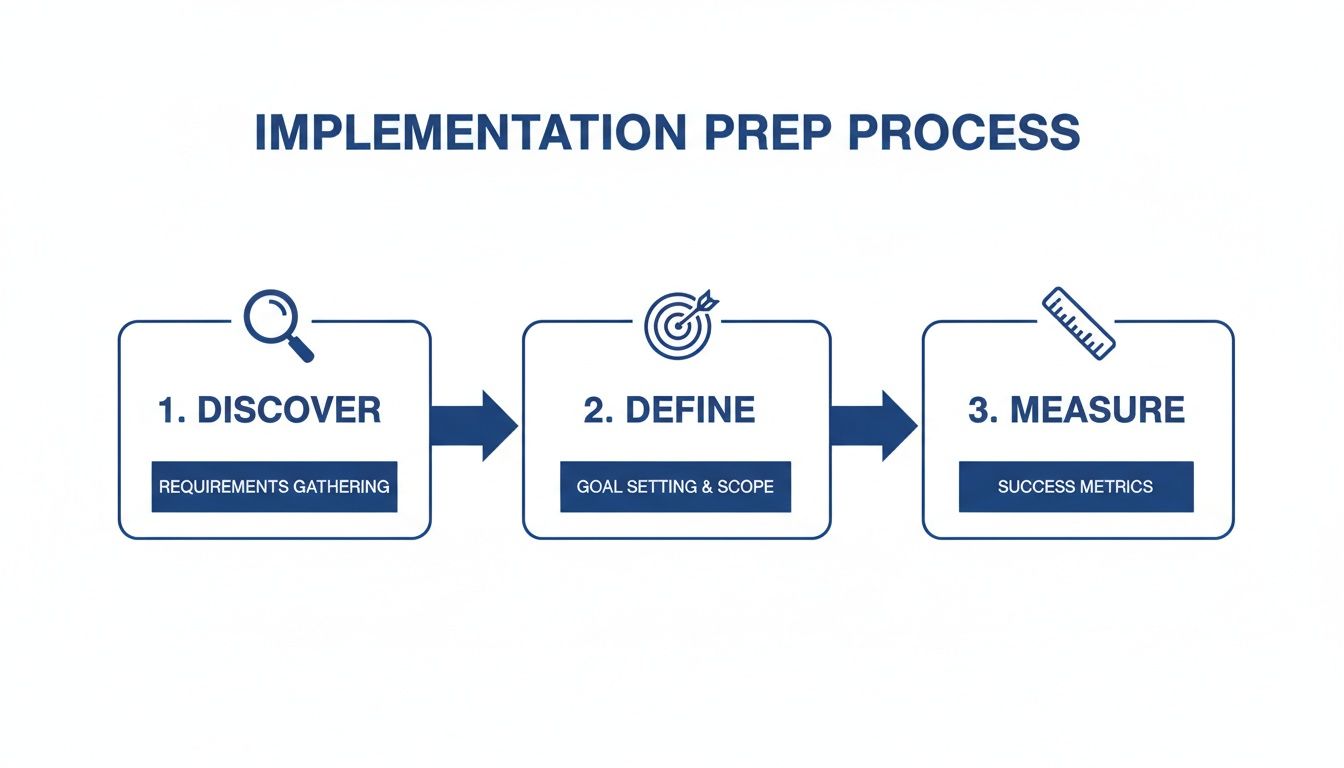
The graphic breaks it down nicely: moving from discovery to defining your goals and then to measurement creates a structured journey that keeps everyone accountable.
By taking this measured approach, you're setting yourself up to ensure your new Work OS delivers real, measurable value right out of the gate. If you're looking for a bit of guidance, working with a certified monday.com partner can be invaluable for helping you navigate this critical planning phase.
Designing and Building Your Custom Work OS

With your goals locked in, it’s time to get our hands dirty and turn that vision into a living, breathing system. This is where we shift from theory to practice, diving deep into the architecture of your monday.com solution—the boards, columns, and automations that will do the heavy lifting for you.
Think of this phase as drawing the blueprints for your digital workspace. A consistent, logical data structure built now is what prevents chaos down the line and unlocks truly powerful reporting. Our goal is to create a system that genuinely supports your team’s daily grind, making their jobs easier, not adding another layer of complexity.
Architecting Your First Workflow
Let's make this real with a common scenario I see all the time: a creative agency building out its project management workflow. A mistake many make is thinking it’s all about a single, massive project board. In reality, the best systems are interconnected.
A smart place to start is with a Client Intake Board. This board is fed by a simple monday.com form, capturing all new project requests and standardising the information you get from day one. Once a project gets the green light, a slick automation can instantly create a new item on your main Projects Dashboard.
This dashboard becomes your command centre. It’s not for micromanaging tasks but for tracking the high-level health of every project:
- Project Name: The official title everyone uses.
- Client: This should be linked to a separate Clients board for centralising all your relationship management.
- Project Manager: The assigned owner from your team.
- Timeline: Key start and finish dates for a bird's-eye view.
- Budget: Simple tracking to see financial health at a glance.
- Overall Status: High-level tags like ‘On Track’, ‘At Risk’, or ‘Complete’.
This structure ensures every single project follows a consistent, repeatable process from the moment it enters your world. No more guesswork.
Building Out the Core Components
From that central dashboard, you start building out the spokes that handle the detailed work. Each project item on the main board can link directly to its own dedicated Project Board. This is where the team lives day-to-day, managing individual tasks, dependencies, and deadlines without cluttering up the high-level view for stakeholders.
The real magic, though, is in connecting these boards with automations. For example, when every task on a project-specific board is marked 'Done', an automation can fire off, updating the master project’s status on the main dashboard to 'Ready for Review'. That one simple rule can eliminate countless "just checking in" emails and status update meetings.
Before you start adding columns and automations, it helps to understand how the basic building blocks fit together.
Core Components of a monday.com Implementation
A breakdown of the essential building blocks for creating a robust workflow, showing how each component contributes to the overall solution.
| Component | Purpose | Example Application |
|---|---|---|
| Workspaces | High-level folders to organise boards by department, function, or client group. | A "Marketing" workspace containing boards for Campaigns, Content, and Social Media. |
| Boards | The central tables that hold all your data for a specific workflow or project. | A "New Hire Onboarding" board to track every step for incoming employees. |
| Groups | Sections within a board used to categorise items by status, priority, or time. | Groups for "This Week," "Next Week," and "Backlog" on a task management board. |
| Items (Pulses) | The individual rows on a board, representing a task, project, client, or record. | An item named "Draft Q3 Newsletter" on the Content board. |
| Columns | The fields that capture specific data points for each item. | Status, Person, Date, and Files columns to manage task details. |
| Automations | "If this, then that" rules that perform actions automatically to save time and reduce errors. | "When Status changes to Done, notify the Project Manager." |
| Dashboards | Visual, high-level views that pull data from multiple boards for reporting. | A "Company KPIs" dashboard showing sales figures, project progress, and support tickets. |
Getting these core components right is the foundation for a scalable and intuitive system.
A well-designed monday.com implementation mirrors how your business actually operates. It connects disparate stages of a workflow into a single, cohesive system where data flows automatically, and everyone has the context they need.
You can take this even further by integrating more advanced AI capabilities. Exploring the best available AI knowledge management tools can introduce smarter ways to organise and find information, making your Work OS even more intuitive. This is a game-changer for businesses that need to manage huge volumes of project documents or client communications. The goal is to build a system where information finds you, not the other way around. By getting the architecture right from the start, you're not just tracking work—you're building a truly intelligent Work OS.
Integrating Systems and Migrating Your Data

Let’s be honest, your monday.com workspace won’t live on an island. Its real magic is unlocked when it starts talking to the other tools your business uses every single day. This is where a smart approach to integration and data migration turns a good setup into a game-changer.
When your Work OS is properly connected, it becomes the single source of truth for your operations. No more flicking between tabs or manually copy-pasting information. To get that seamless flow of data and automation, you need to think about essential system integrations right from the start of your monday.com setup.
Connecting Your Tech Stack
The goal here is simple: build automated bridges between your systems. You can start with the native integrations available right inside monday.com, which are often surprisingly easy to set up for the big-name apps.
My advice? Focus on the high-impact connections first. Think about what will save the most time or prevent the most mistakes.
- Accounting: Hook up monday.com with Xero. When a project status flips to 'Complete', an invoice can be created automatically. Simple, but brilliant.
- Sales & CRM: Integrate with HubSpot. As soon as a deal is marked 'Closed-Won', a new client project board is instantly spun up in monday.com, ready for the delivery team.
- Communications: Link with Slack. A new high-priority task gets created or updated? A notification is instantly pushed to the right team channel. No delays.
These connections are all about eliminating manual handoffs, which is where errors creep in and workflows grind to a halt.
Tackling Data Migration Methodically
Migrating data from old spreadsheets or clunky legacy systems always feels like the most intimidating part of any implementation. But it really doesn’t have to be a nightmare. A clean, organised migration means your team has all the historical context they need from day one.
A smooth data migration is less about technical wizardry and more about disciplined preparation. Don't just dump old data into your new system—use this as an opportunity to clean house and only bring across what is genuinely valuable.
Start by exporting your existing data into a CSV file. Before you even think about importing it, you have to get it clean. This means hunting down and removing duplicate entries, fixing inconsistencies (like "NZ" vs "New Zealand"), and binning all that obsolete information you’ve been hoarding for years.
Next comes the mapping. You need to line up the columns from your old spreadsheet to the new columns you've so carefully built in your monday.com boards. This is a critical step. It ensures the 'Client Name' field from your Excel file actually ends up in the 'Client Name' column in your new workspace. Once that’s done, you can use monday.com’s import features to pull the data across.
When done right, the impact is massive. Just look at Datacom, a major NZ IT services provider. They used monday.com for their CRM and ITSM needs, which cut their campaign execution time by 25%. They now manage over 15,000 automated tasks every month. It’s a perfect example of how proper integration and data migration fuels huge efficiency gains.
Connecting your systems is fundamental to building a powerful Work OS. If you need a hand navigating this process, check out our guide on monday.com integration services.
Driving Adoption with Effective Training and Governance
You can design the most elegant, powerful system imaginable, but it's worthless if your team doesn't actually use it. This is the hard truth of any software rollout: the human side of the implementation is often the most critical factor for success, yet it's the part that gets overlooked the most.
To truly make monday.com stick, you need more than just a technical deployment. You need a thoughtful approach to training and a clear set of rules for governance. This is what turns a tool into a genuine operational improvement. Forget those generic, two-hour "feature tour" sessions. They're a recipe for information overload and guarantee nobody will remember a thing. The focus has to be on practical, role-based training that solves a real-world problem for each team.
Building a Role-Based Training Programme
Your marketing team couldn't care less about the finance department's approval workflows, and vice versa. This is why tailored training is absolutely essential. A successful programme is built around one simple question for every user: "What's in it for me?"
For example, a training session for your project managers should dive straight into building timelines, managing resources with workload views, and setting up automated status reports. When you're training the sales team, you'd show them exactly how to manage their leads on a Kanban board and automate the handover to the client onboarding team.
This approach is powerful for two reasons:
- It’s instantly relevant: Users see how monday.com makes their specific job easier, not more complicated.
- It builds confidence: By starting with familiar tasks and workflows, teams feel empowered and are far more likely to explore other features on their own down the track.
Crafting these bespoke learning experiences is something we specialise in. You can learn more by exploring our dedicated monday.com training and support services.
Empowering Internal Champions
Alongside your formal training sessions, one of the most effective strategies is to identify and empower a few internal ‘champions’. These are the people in your organisation who are naturally tech-savvy, pick up the system quickly, and are genuinely enthusiastic about helping their colleagues.
Don't just give them a pat on the back; give them a real role.
Your monday.com champions are your on-the-ground support network. They’re the ones who translate technical features into practical team benefits, build excitement, and provide peer-to-peer help that feels much more approachable than logging a formal IT ticket.
These champions can run informal Q&A sessions, share clever tips in team meetings, or just be the first person someone asks when they have a simple query. This takes a huge load off the core implementation team and creates a fantastic culture of shared ownership.
Establishing a Governance Framework
Without clear rules of the road, even the most organised workspace can descend into chaos surprisingly quickly. A governance framework is your rulebook for keeping the system clean, scalable, and secure. Nailing this down from day one is what stops your shiny new monday.com account from becoming a messy, digital free-for-all.
Your framework should clearly define:
- User Permissions: Who can create or edit boards, dashboards, and automations? Getting the distinction right between viewers, members, and owners is fundamental to protecting your data.
- Board Creation Standards: Have a simple process for requesting a new board. This is the best way to prevent duplicate or unnecessary boards from cluttering up everyone's workspace.
- Change Management Process: How will you handle requests for new columns, automations, or integrations? A simple request form on a dedicated board can manage this flow perfectly.
This kind of foresight ensures your workspace remains an organised, powerful asset that grows with your business, not a digital attic filled with junk.
Measuring Success and Optimising for Growth
Getting to go-live isn’t the finish line; it’s the starting pistol. Now the real work begins: proving the value of your new system and, just as importantly, making it even better. A successful monday.com implementation is a living thing—it has to evolve with your business to stay sharp.
This is where you circle back to those KPIs you defined way back in the planning phase. Those metrics are now your compass. The goal is to move beyond anecdotal wins ("things feel faster!") to hard data that shows a clear return on investment.
Building Your ROI Dashboard
The best way to see how you're tracking is by building insightful dashboards right inside monday.com. This isn't just a vanity project for the IT team; it's a powerful tool for showing leadership the tangible benefits of the rollout in real-time.
A well-built dashboard can pull live data from across your workspaces, giving you an instant health check.
Here are a few essential metrics to get you started:
- Project Velocity: How many tasks or projects are your teams actually completing per week or month compared to the old way of doing things?
- Team Capacity: Use the Workload widget to see who’s drowning and who has room to take on more. It’s the key to smarter resource allocation.
- Cycle Time: Measure the average time it takes for a task to get from 'In Progress' to 'Done'. Shorter is always better.
- Sales Forecast Accuracy: For sales teams, this is huge. Compare the revenue you forecasted in monday.com against the deals you actually closed.
Tracking these numbers gives you undeniable proof of efficiency gains. For instance, we've seen our monday.com rollouts reduce manual task tracking by 40% in a typical mid-sized NZ retail firm, saving them over 5,000 hours a year. That’s how a structured implementation translates directly into measurable savings. You can discover more about Wisely's business process management work in NZ on reseller.co.nz.
Fostering Continuous Improvement
Your implementation should never be considered "finished." The most successful organisations we work with treat their Work OS as a system to be constantly optimised. That means actively seeking out feedback and hunting for opportunities to refine your workflows.
A static implementation will quickly become outdated. The real value comes from fostering a culture where the system is constantly refined based on real-world usage and feedback, ensuring it adapts as your business needs change.
A great way to kickstart this process is by scheduling regular user feedback sessions a few weeks after going live. These aren’t bug-hunting expeditions; they are for uncovering friction points and finding out how the system is really performing in the wild.
Get your teams in a room and ask them direct questions:
- Which part of the new workflow feels clunky or just plain slow?
- Are there any automations that aren't firing the way you expected them to?
- What manual task are you still doing that you secretly wish the system would just handle for you?
The answers you get are pure gold. They give you a clear roadmap for your next round of optimisations, whether that means tweaking an automation, adding a new column to a board, or running some targeted top-up training. This iterative approach ensures your monday.com workspace doesn't just meet your needs on day one—it anticipates and adapts to them for years to come.
Got Questions About Your monday.com Implementation?
When you’re looking at bringing a platform like monday.com into your business, a few key questions always pop up. Getting these sorted upfront is the best way to set clear expectations and make sure everyone is confident in the plan. We've heard them all, so we’ve put together the answers we give our clients to help you move from uncertainty to a clear path forward.
How Long Will a monday.com Implementation Take?
This is usually the first thing people ask, and the honest answer is: it really depends on how deep you want to go. There’s no single timeline for a monday.com implementation.
For a small team with a pretty clear workflow, you could be up and running in as little as 2-4 weeks. This usually means getting a few essential boards built, adding some simple automations, and training the team. It’s a fantastic way to get a quick win on the board and show the value straight away.
However, if you're planning a full, company-wide rollout, you’re looking at a much bigger project. Migrating years of data, designing complex workflows that connect multiple departments, and building custom integrations with your existing software stack realistically pushes the timeline out to 2-3 months.
The single most important thing for setting a realistic timeline is doing the homework first. A proper discovery phase where you define the scope, map out the milestones, and truly understand what each team needs is non-negotiable. This is how you avoid scope creep and keep the project on track, and it’s a cornerstone of how we work.
What Are the Biggest Pitfalls We Should Avoid?
Knowing where things can go wrong is the best way to keep them from happening. In our experience, the biggest hurdles aren’t technical at all—they’re about strategy and people.
The most common mistake we see is jumping in without clear, measurable goals. If you don't define what success actually looks like from day one, the project will drift without direction, making it impossible to ever prove its worth or measure ROI.
Another huge risk is underestimating change management. You can build the most elegant, perfect system in the world, but if your team isn't on board, it’s all for nothing. Without effective, role-based training and clear communication about why you're making the change, user adoption will stall. The tech is only half the equation; your people need to feel supported and confident using it.
And finally, ignoring governance from the start is a surefire recipe for chaos down the line. Without clear rules for things like user permissions, naming conventions, and who can create what, your shiny new workspace can quickly turn into a messy, inconsistent digital attic that’s impossible to manage, let alone scale.
Should We Do It Ourselves or Hire a Partner?
This is a big one, and it comes down to your internal team’s bandwidth and the scale of your ambition. A tech-savvy team can definitely get a basic setup going for a single department, but the value of a certified partner really shines when your needs get more complex.
Here’s how to think about it:
- The DIY Approach: This can work well for small teams with simple workflows. If you have people with a high degree of technical confidence and, crucially, the time to learn, build, and troubleshoot, you can certainly make progress on your own.
- A Partner-Led Implementation: This is the way to go for businesses aiming for a real operational shift. A partner brings the experience from dozens of other implementations. We know where the traps are, how to design workflows that scale, how to handle those tricky integrations, and most importantly, how to drive user adoption far more effectively than a team going it alone.
For any organisation that’s serious about transforming how it works and getting the maximum return on their investment, a partner-led monday.com implementation is simply the most reliable and efficient path to success.
At Wisely, we provide the expert guidance to ensure your implementation is not just a software rollout, but a genuine business improvement. Learn how we can help you build a smarter way to work.