Ever feel like your team is flat out, constantly busy, but the big-picture goals just aren't moving forward? It’s a classic frustration for New Zealand businesses, where long hours and hard work don't always lead to meaningful results. If you really want to boost your team's productivity, it's time to stop focusing on working harder. The real win comes from working smarter by fixing the broken manual processes and building efficient digital workflows that actually support your people.
The Myth of Busyness in New Zealand Businesses
In many Kiwi SMBs, seeing the team work late is often mistaken for dedication and high performance. Desks piled high with paperwork, overflowing inboxes, and staff juggling a dozen tasks at once can create a powerful illusion of productivity. But when you step back and look at the actual outcomes—missed deadlines, stalled projects, and a team on the verge of burnout—it becomes crystal clear that activity doesn't equal achievement.
This isn't just a hunch; it's a well-documented national challenge. The problem isn't a lack of effort. In fact, New Zealanders work some of the longest hours in the OECD. The real issue is how that time is being spent. A revealing report from The Treasury notes that Aotearoa has gone from being one of the most productive economies to one of the least, with our growth coming from “more people working more hours” rather than from better systems.
While Stats NZ data shows our labour productivity has crept up over the years, this small gain is completely overshadowed by our long working hours. It points to a massive opportunity for improvement. For anyone interested in the data, The Treasury's detailed analysis is a real eye-opener.

Uncovering the Real Productivity Killers
Look, the standard "productivity hacks"—like time-blocking your calendar or aiming for inbox zero—might give you a small, temporary boost. But they completely fail to address the deep, systemic issues that are truly holding your team back. These quick fixes are like putting a plaster on a broken bone.
The true bottlenecks are almost always hidden in plain sight, tangled up in your day-to-day operations. They’re the manual, repetitive, and disconnected processes that quietly drain time and energy away from the work that actually matters.
We see these all the time in NZ businesses:
- Data Double-Handling: An employee manually copies customer details from an email into a spreadsheet, then into the project tool, and finally into the invoicing software. It’s painful just to think about.
- Manual Reporting: A manager spends half a day every single week chasing people for updates just so they can cobble together a status report for leadership.
- Communication Silos: The sales team promises a client a tight deadline without seeing that the production team is already at full capacity, sparking internal fires that need putting out.
These friction points are where productivity goes to die. Every minute an employee spends on a low-value, manual task is a minute they aren't spending on client strategy, innovation, or bringing in revenue.
Shifting From Hard Work to Smart Systems
To genuinely lift your team's performance, you need a completely new game plan. It’s not about squeezing more hours out of the day or pushing your people to the brink. It’s about designing a fundamentally smarter way of working.
This means deliberately replacing chaotic, manual workflows with structured, digitised systems. For a deeper dive, it's worth understanding the principles of effective business process improvement. The ultimate goal is to build an operational backbone that properly supports your team, automates the soul-crushing admin, and gives everyone clear visibility. This guide will walk you through exactly how to diagnose your unique bottlenecks and build the systems that will finally unlock your team's true potential.
Find Your Hidden Productivity Drains
Before you can fix a problem, you have to truly understand it. Too many businesses jump straight to buying new software or designing new processes without ever really knowing what's broken. That’s like trying to fix a car engine with a blindfold on – you’re just guessing.
To make a real difference to your team’s productivity, you first need to become a bit of a detective. Your job is to uncover where work gets stuck, slowed down, or needlessly duplicated. This isn't about blaming people; it's about mapping the current reality, no matter how messy, to find the friction points that are quietly sabotaging your team's best efforts. The goal is simple: get an honest, ground-level view of how work actually gets done, not just how you think it gets done.
The Perception Gap Between Leaders and Teams
There's often a massive disconnect between how leaders see productivity and what their teams are actually experiencing on the front lines. This is one of the biggest roadblocks to making meaningful improvements.
Recent New Zealand survey data paints a clear picture of this exact issue. In a 2023 survey, a whopping 70% of employers felt that productivity had increased in their organisation. The problem? Only 36% of their employees agreed. You can read more about the surprising differences in productivity perceptions.
This gap shows that while leadership might see the high-level results, their teams are often still wrestling with clunky workflows and scattered information just to get there.
This gap is where your best opportunities are hiding. The frustration your team feels with a broken process is a clear signal pointing directly to a potential productivity win.
How to Conduct a Practical Workflow Audit
Running a workflow audit doesn't have to be some massive, formal undertaking. For a small or mid-sized Kiwi business, it can be a focused effort to map out one critical process and, most importantly, gather direct feedback from the people doing the work.
Start by asking your team a few simple but powerful questions:
- What’s the one task you do every week that feels like a complete waste of time?
- Where do you have to enter the same information into more than one system?
- When do you most often have to stop work and wait for someone else to give you information or an approval?
Their answers are your treasure map. They’ll lead you straight to common bottlenecks like data double-handling, endless manual reports, and communication breakdowns between departments. For those looking to see what's possible once you find these issues, understanding the options for NZ business process automation services can open your eyes.
A Quick Guide to Spotting Bottlenecks
Sometimes the symptoms of a productivity problem are obvious, but the root cause isn't. This table helps you connect the dots between what your team is feeling and the underlying process issue that might be causing it.
Common Productivity Bottlenecks and Their Symptoms
| Symptom Your Team Experiences | Potential Bottleneck | First Diagnostic Question to Ask |
|---|---|---|
| "I spend hours just copying and pasting data between spreadsheets and our CRM." | Manual Data Entry / Double Handling | "Can we map out every single place this piece of information has to be entered manually?" |
| "We're constantly waiting for approvals, and it holds up the whole project." | Approval Delays / Unclear Sign-off | "Who needs to approve this, and what information do they need to make a decision instantly?" |
| "I can never find the latest version of the client brief; it's buried in an email somewhere." | Scattered Information / Lack of Centralisation | "Where is the single source of truth for this project, and does everyone have access to it?" |
| "I have to create the same sales report from scratch every single week." | Repetitive Manual Reporting | "What's the one metric we need from this report, and can we build a dashboard to show it automatically?" |
Think of these as conversation starters. Use them to dig deeper with your team and get to the heart of the problem.
Real-Life Example: A Client Services Bottleneck
Let's look at a client services team at a growing marketing agency. Their client onboarding process was a complete mess of disconnected tools and manual steps.
Here's how it worked (or didn't):
- The Trigger: A signed contract would arrive in a sales rep's email inbox.
- Manual Handover: The sales rep then forwarded that email to an account manager.
- Data Re-entry: The account manager had to manually copy all the client details from the contract into a master spreadsheet.
- Task Creation: They would then create separate tasks for the design and content teams on a project board.
- Communication Chaos: Any questions or updates happened randomly across long email threads and DMs, with no central place to see what was going on.
The team was working incredibly hard, but client onboarding was slow and riddled with errors. They felt unproductive because all their effort wasn't leading to a smooth, professional client experience. Meanwhile, the leadership team, only seeing the final outcomes, couldn't figure out why it was all taking so long. By simply getting everyone in a room and mapping this workflow out on a whiteboard, the real problem became painfully obvious.
Designing Digital Workflows That People Actually Use
Once you’ve uncovered where work is grinding to a halt, the real work begins: designing a better way forward. This is so much more than just buying a new piece of software. It’s about carefully architecting a process that removes friction, clarifies who does what, and genuinely makes it easier for your team to produce their best work. Think of a well-designed digital workflow as the central nervous system for your projects. It ensures everyone is on the same page and working from the same information—a massive leap for any team battling scattered data.
Building Your Single Source of Truth
The absolute cornerstone of any effective workflow is creating a single source of truth. This is your central hub. It's one accessible place where all project information, conversations, and files live. It's the ultimate cure for digging through endless email chains or hunting down the latest version of a document someone saved to their desktop.
When information is centralised, everyone from the leadership team to the people on the front lines gets instant visibility. This simple change can save hundreds of hours otherwise lost to searching for information and fixing mistakes caused by outdated data.
This diagram breaks down a simple, three-step approach to auditing your current processes before you build anything new.
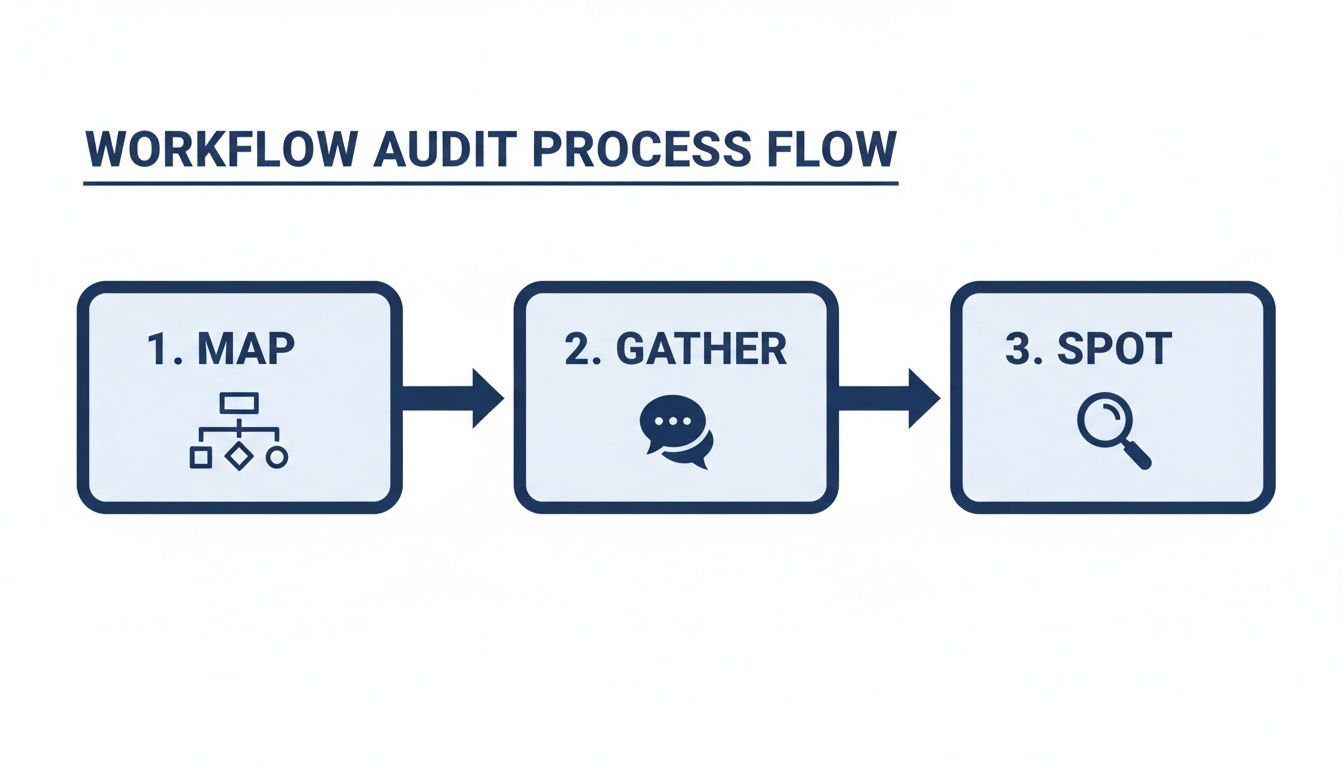
By systematically mapping what you do now, getting honest feedback from the team, and spotting the exact points of friction, you create a solid blueprint for your new digital workflow.
From Manual Chaos to Automated Clarity
Let’s get practical with a real-world scenario. I’ve seen this countless times. Imagine a finance team at a mid-sized NZ company absolutely drowning in manual invoice processing. Their “workflow” was a messy combination of emails, spreadsheets, and chasing people down the hallway.
The "Before" Workflow:
- An invoice lands in a shared email inbox.
- An admin manually types the details into a sprawling spreadsheet.
- They then have to email the right department head for approval.
- That department head is busy and might take days to reply, creating a huge bottleneck.
- Once it's finally approved, the admin updates the spreadsheet again and schedules the payment.
The whole process was painfully slow, wide open to human error, and offered zero visibility. The finance manager couldn’t easily see which invoices were stuck waiting for approval or get a clear picture of the company's cash flow commitments.
A workflow is only as strong as its weakest link. In manual processes, the weak links are almost always waiting for a person to do something and the risk of a typo with every keystroke.
By redesigning this entire process within a Work OS, the team saw a night-and-day improvement. For a hands-on approach to this kind of change, a guided monday.com implementation can provide the structure needed to make it happen smoothly.
The "After" Workflow:
- Centralised Hub: We set up a dedicated 'Invoice Processing' board in monday.com. Now, all invoices are sent to a specific email address that automatically creates a new task on the board and attaches the invoice file. No more manual entry.
- Automated Assignments: The moment a new invoice task is created, an automation rule instantly assigns it to the correct department head for approval based on the supplier.
- Clear Approval Cycle: The department head gets an instant notification. They can view the invoice and approve it with a single click, which automatically updates the status from 'Pending Approval' to 'Approved for Payment'.
- Real-Time Visibility: The finance team now has a live dashboard showing the status of every single invoice, the total value of approved payments, and any emerging bottlenecks.
This new workflow didn't just speed things up. It completely eliminated manual data entry, created a bulletproof audit trail, and gave the entire team confidence in their process.
Choosing Your Tools and Driving Team Adoption
Once you’ve designed a smarter, digital workflow, it's time to bring it to life with the right technology. A new process on paper is just a theory. A powerful tool is what turns that theory into a daily, working reality.
This is where a Work OS (Work Operating System) like monday.com really comes into its own, pulling your operations out of scattered spreadsheets and chaotic email chains into one central place. But let’s be honest, the best software in the world is useless if your team doesn't actually use it. Nailing the implementation is as much about people as it is about the platform.
Centralising Your Operations with a Work OS
For so many Kiwi businesses, work is fragmented. Project plans are in one app, customer info is in a CRM, and crucial conversations are buried in an inbox somewhere. A Work OS is built to fix this exact problem, bringing everything together in a single, visual environment you can customise to your needs. This immediately tackles one of the biggest productivity killers out there: context switching. Instead of your team constantly jumping between different apps, they can manage projects, track sales leads, and collaborate on tasks—all without leaving the platform.
Just look at this monday.com dashboard. You can see project timelines, team workloads, and budgets all in one snapshot.
The real magic here is the visibility it creates. When everyone, from leadership to the front line, is looking at the same real-time data, decisions get faster and a whole lot smarter.
Strategies for Driving Genuine Team Adoption
Announcing a new tool and just hoping everyone will embrace it is a surefire way to fail. You need a proper plan to manage the change and make sure your new system actually sticks. Here are a few strategies I’ve seen work time and time again:
- Find Your Champions: In every team, there are a few people who are tech-savvy and well-respected. Get them involved early, train them up to be experts, and empower them to be the go-to people for their colleagues. Peer-to-peer support is almost always more powerful than a directive from the boss.
- Focus on the "What's In It For Me?": Don't just talk about company goals. Frame the new tool in terms of how it makes each person's job easier. Show them how it gets rid of their most annoying tasks, like chasing approvals or manually building reports. When they see it as a solution to their daily headaches, they'll want to use it.
- Celebrate the Small Wins (Loudly): In those first few weeks, make a big deal out of every success. Did that new automation save someone two hours? Tell the whole team. Did a project finish ahead of schedule because of the new workflow? Celebrate it. These little victories are what build unstoppable momentum.
The goal isn't just to get people to use the new system; it's to make it the path of least resistance. When the new way of doing things is clearly easier and more effective than the old way, adoption happens naturally.
Real-Life Example: A Construction Company Transformation
I worked with a construction company that was struggling with site management. The site manager, project manager, and office admin were constantly out of sync. Information was flying around in phone calls, text messages, and scribbled notes, which was causing costly delays and mistakes. Their initial resistance to a new system was high. The crews on-site were set in their ways and saw a digital tool as just another piece of admin.
So, we tackled it in phases:
- Start with One Pain Point: We began with just their daily site reports. We built a dead-simple form in monday.com that site managers could fill out on their phones in a couple of minutes, automatically logging progress and attaching photos. No more paperwork.
- Provide Hands-On Training: We didn't just email a user guide. We went on-site and ran training sessions, showing the teams exactly how this saved them time compared to their old clipboard system. For businesses that need a bit more guidance, structured monday.com training and support is often the key to building that long-term confidence.
- Make the Benefits Obvious: Within a week, the project manager back at the office had a real-time view of every single site without making one phone call. They could spot problems instantly and move resources around to fix them—a huge win they shared with the whole company.
That one small, initial success proved the value of the system. It broke down all that initial scepticism and opened the door for us to roll out more advanced features, eventually changing how their entire company managed projects from tender to handover.
Measure What Matters With the Right KPIs
So, you’ve designed a slick new workflow. It feels faster, looks cleaner, and your team seems happier. But how do you know it’s actually working?
Boosting productivity isn't a one-and-done deal. To make sure your great ideas turn into lasting improvements, you have to measure the impact. This is where Key Performance Indicators (KPIs) come in. We need to track the numbers that prove your new systems are genuinely saving time, cutting out frustration, and freeing up your team to do their best work.

From Guesswork to Data-Driven Insights
The whole point of setting KPIs is to trade gut feelings for hard facts. Instead of feeling like client onboarding is faster, you can point to a chart and show it’s 25% quicker. This is what separates businesses making fragile gains from those building resilient, system-driven operations that last.
A structured approach, backed by real numbers, is the best defence against productivity volatility. By tracking the right things, you create a powerful feedback loop. You prove the value of the changes you've made and, just as importantly, you uncover the next opportunity for improvement.
Choosing KPIs That Reflect Real Progress
Your KPIs should tie directly back to the bottlenecks you found in the first place. If manual reporting was eating up everyone’s Friday afternoon, then your star KPI should be “Reduction in Manual Reporting Hours.”
Here's a quick look at how you can apply this logic across different departments.
| Department | Before KPI (Manual Process) | After KPI (Digitised Workflow) |
|---|---|---|
| Client Services | Average Client Onboarding Time (e.g., 15 business days) | Average Client Onboarding Time (e.g., 5 business days) |
| Sales Team | Lead-to-Conversion Time (e.g., 4 weeks) | Lead-to-Conversion Time (e.g., 1.5 weeks) |
| Finance Department | Invoice Processing Cycle Time (e.g., 10 days) | Invoice Processing Cycle Time (e.g., 2 days) |
| HR | New Hire Paperwork Completion (e.g., 3 hours per hire) | New Hire Paperwork Completion (e.g., 30 minutes per hire) |
These examples show a clear ‘before and after’ story, making it easy for everyone to see the tangible benefits of the new workflow.
The best KPIs are simple, specific, and easy to measure. If you can't see the result on a dashboard at a glance, it's probably too complicated.
With a platform like monday.com, this becomes incredibly straightforward. You can build dashboards that pull this data automatically and display it in real-time. Imagine a live chart on a screen in the office showing the average project completion rate, ticking up as your team works. That’s not just a report—it’s a motivator and a decision-making tool all in one.
Turning Measurement Into a Continuous Cycle
Tracking KPIs isn't just about patting yourself on the back. It’s about looking ahead. The real magic happens when you turn measurement into a regular habit, a rhythm for continuous improvement.
We call this a "workflow health check." Think of it as a quarterly tune-up for your processes. Get the right people in a room, pull up the dashboards, and ask three simple questions:
- What's working well? Find the KPIs that have shot up. Celebrate those wins! It reinforces the value of the changes and gets everyone bought in.
- Where are we still feeling friction? Are there any metrics that haven’t budged? Or even gone backward? That’s your signpost for the next bottleneck to tackle.
- What's our next automation opportunity? Based on the data and what the team is saying, pinpoint one more repetitive task you can get rid of in the next 90 days.
This simple, repeatable process turns productivity from a one-off project into a core part of your company culture. For a structured way to run this, a professional monday.com health check can bring in an expert eye to spot opportunities you might be too close to see.
Common Productivity Questions Answered
Even with the best intentions, kicking off a productivity improvement project can feel a bit overwhelming. It’s totally normal for business leaders and their teams to have questions about the cost, the effort involved, and the potential disruption. Here are some honest, straightforward answers to the most common concerns we hear.
How Much Does a New System Really Cost?
This is usually the first question on everyone's mind, and for good reason. The cost of bringing in a new system like monday.com is more than just the software licence; it’s an investment in a smarter way of working. While there’s a subscription fee based on your team size, just buying licences without a solid plan is like buying a pile of gym equipment and hoping you’ll magically get fit.
The real value comes from getting an expert to help configure the platform to solve your specific, most painful bottlenecks. For instance, we recently helped a client automate a daily reporting task that used to take a key staff member one hour every single day. That simple fix saved them over 240 hours a year—that’s six full weeks of paid work time reclaimed from one automation. We provide tailored quotes based on your unique business processes and goals, ensuring any investment is tied directly to the value you’ll get back.
What If Our Team Is Resistant to New Technology?
This is a big one, and a completely valid concern. The secret to getting your team on board isn't about forcing a new tool on them. It’s about making the change with them, not to them. Most resistance comes from a fear of the unknown or the perceived hassle of learning something new.
The best strategy we’ve found is to involve your team right from the start. Ask them about their biggest daily frustrations. When they see that the new system is specifically designed to make those exact problems disappear, they quickly turn from sceptics into champions.
True adoption happens when the new way of working is visibly easier and more effective than the old way. The goal is to make the new system the path of least resistance.
Our approach always includes structured change management. We find enthusiastic ‘champions’ within your team who can lead the way, provide hands-on training, and—most importantly—demonstrate "what's in it for them" from day one. This builds real momentum and helps make the change stick.
Can We Improve Productivity Without a Big New System?
Absolutely. You can definitely make small, incremental gains by tweaking your existing processes. Things like clarifying roles or standardising a checklist can certainly help. But you will inevitably hit a ceiling where real, significant progress is impossible without better technology.
From our experience, the biggest leaps in productivity come from three key things:
- Centralising information so everyone is working from a single source of truth.
- Automating repetitive tasks to free up your team’s time and mental energy.
- Gaining real-time visibility into how projects and performance are tracking.
These are precisely the strengths of a Work OS like monday.com. Without a central platform, your processes will always be fragmented across scattered spreadsheets, messy email inboxes, and a bunch of disconnected apps. That fragmentation is a structural barrier to serious efficiency gains. We figure out your processes first, then fit the technology to them—ensuring you’re building a more productive way of working, not just buying software.
How Long Until We See a Return on Investment?
The timeline for seeing a return really depends on the complexity of the workflows you want to improve, but many of our clients see immediate "quick wins" that build confidence right out of the gate.
Automating a single, high-frequency task can deliver an instant payback. For example, a sales team that automates lead assignment and follow-up reminders can save dozens of hours every month, letting them focus on actually selling instead of doing admin. These initial victories often show up within the first few weeks.
More substantial ROI, like shorter project timelines, increased team capacity, or happier clients, typically becomes obvious within the first 3 to 6 months. That’s the point where your team has fully adopted the new system and it’s become part of your daily rhythm. We work with you to set and track the right KPIs from the beginning, so you can clearly measure the financial and operational impact of your investment over time.
Ready to stop being busy and start being productive? Wisely designs and implements digitised workflows that eliminate inefficiency and give you the visibility you need to grow. See how we can transform your team's productivity at https://www.wiselyglobal.tech.