For a lot of Kiwi business owners, the idea of cyber security seems like a problem for the big players overseas, not something that really affects them here at home. This is a dangerously common mistake. The reality is, if your business has any kind of online presence in New Zealand, you have a digital front door—and far too many are left wide open for anyone to walk through.

The Unseen Risk to New Zealand Businesses
Think of your business's online operations—your website, email, cloud storage—as your digital shopfront. It’s where you meet customers, but it's also exposed to the street. A persistent myth is that small and medium-sized businesses (SMBs) are too small to attract the attention of cybercriminals.
The truth is quite the opposite. Most cyber attacks aren't personal; they're automated. Bots are constantly scanning the internet for any weakness, regardless of whether your business is a small local cafe or a multinational corporation. If there's an unlocked door, they'll find it.
This isn’t some far-off threat; it's happening right here, right now, and it's expensive.
Top Cyber Threats Facing NZ Businesses This Quarter
The latest data from local incident reports paints a clear picture of what Kiwi businesses are up against. These aren't complex, movie-style heists; they're common, effective attacks that prey on everyday vulnerabilities.
| Threat Type | Number of Incidents Reported | Quarterly Trend |
|---|---|---|
| Phishing & Credential Harvesting | 1,021 | ▲ Increasing |
| Scams & Fraud | 875 | ▲ Increasing |
| Unauthorised Access | 459 | ► Stable |
| Ransomware | 112 | ▼ Decreasing |
These numbers highlight that simple deception tactics like phishing are still the most common way criminals gain access. The financial fallout from these incidents is staggering. In the first quarter of this year alone, direct financial losses from cyber crime in New Zealand hit NZD $7.8 million. That's a sharp 14.7% jump from the previous quarter, proving this problem is growing, not shrinking.
The Damage Goes Beyond the Bank Account
While a multi-million dollar loss grabs headlines, the true cost of a breach goes much deeper. For an SMB, the ripple effects can be absolutely devastating and often harder to recover from than the initial financial hit.
A single successful attack can trigger a nasty domino effect:
- Operational Disruption: Imagine your systems are frozen by ransomware. You can't process orders, contact customers, or even access your own files. Your entire business grinds to a halt for days, or even weeks.
- Reputational Damage: Your customers trust you with their personal information. A breach shatters that trust in an instant. They’ll start looking elsewhere, and the stain on your brand can last for years.
- Data Loss and Recovery Costs: The expense of cleaning up is often crippling. You're paying for IT specialists to restore systems, recovering what data you can, and managing the legal requirement of notifying everyone affected.
The most important mindset shift for any New Zealand business owner is to stop thinking, 'It won't happen to me,' and start asking, 'What's our plan for when it does?' This is the cornerstone of building genuine cyber resilience.
Understanding these real-world consequences is the first step. The good news is that you're not alone in this. Seeing how other businesses have strengthened their defences can offer a practical roadmap. That’s why we always recommend looking at real-world case studies to see what works.
From here, this guide will give you the actionable advice you need to lock your digital front door and protect the business you've worked so hard to build.
Navigating the New Zealand Cyber Security Ecosystem
Getting your head around cyber security in New Zealand goes beyond just software and passwords. It's about knowing who has your back when things go wrong. We have some key government bodies set up specifically to help businesses and individuals stay safe, and it pays to see them as allies, not just faceless agencies.
CERT NZ: The Digital First Responders
Think of CERT NZ (the Computer Emergency Response Team) as the nation's digital fire department. When a cyber incident hits your business—whether it's a phishing attack, a clever scam, or the dreaded ransomware—they are your first official port of call. Their job is to give you clear advice, track the threat, and walk you through the immediate steps to contain the damage.
For small to medium businesses that often don't have a dedicated IT security team, this support is a lifeline. Reporting an incident to CERT NZ doesn't just get you a solid action plan; it also feeds into a national picture of current threats, which in turn helps protect other Kiwi businesses from the same fate.
NCSC: The National Defence for Our Digital Assets
While CERT NZ is on the frontline helping everyone, the National Cyber Security Centre (NCSC) operates on a completely different scale. The NCSC is New Zealand's national defence force against major cyber threats, with a laser focus on protecting our critical infrastructure and organisations of national significance.
Their work involves sophisticated threat analysis and intelligence gathering, defending government networks and essential services like our energy grid, banking systems, and transport. Most SMEs won't deal with the NCSC directly, but their efforts behind the scenes create a much more secure digital environment for all of us to operate in.
Your Legal Responsibilities Under the Privacy Act
Beyond the government support available, you also have legal responsibilities, especially when it comes to your customers' data. The Privacy Act 2020 is the main piece of legislation here, and it’s not just for the big players. It lays down the rules for how every New Zealand business must handle personal information.
The core idea is simple: if you collect personal data, you have a duty to protect it. This means having proper security measures in place to stop it from falling into the wrong hands through unauthorised access or a data breach.
The biggest change in the Privacy Act 2020 was the introduction of mandatory breach notifications. If your business has a data breach that is likely to cause serious harm to someone, you are now legally required to tell the affected people and the Privacy Commissioner.
Failing to report a serious breach can lead to hefty fines, but the real cost is the catastrophic loss of customer trust. This legal requirement really drives home why having an incident response plan is non-negotiable. Knowing what data you hold, where it lives, and who can access it is no longer just good practice—it's the law.
For businesses that handle sensitive third-party information, like those in media production, these obligations are fundamental. Their compliance is often checked through a formal TPN assessment, which makes sure they meet strict industry security standards.
Understanding this ecosystem of support and regulation is the foundation of good cyber security in New Zealand. When you know who to call and what your duties are, you're in a much stronger position to handle incidents effectively and build a more resilient business.
Why Cybercriminals Target Small and Medium Businesses
One of the most dangerous myths we hear from Kiwi business owners is that they’re too small to be a target. The thinking is usually, “Why would a hacker bother with my little business when they could go after a big bank?” But that’s not how it works anymore. The reality is, small and medium businesses (SMBs) aren't just on the list; they're often at the top of it.
To get a clearer picture, stop thinking of cybercriminals as masterminds planning an elaborate casino heist. Instead, picture them as opportunistic burglars walking down a long street, methodically checking every single door handle. They’re not targeting your house specifically. Their automated tools are simply looking for the first unlocked door they find.
Your business is one of those doors. Cybercriminals run scripts that relentlessly scan the internet for common, easy-to-exploit weaknesses. It’s purely a numbers game, and unfortunately, SMBs often represent the path of least resistance.
The Perfect Storm of Vulnerability
So, what makes a Kiwi SMB such an appealing target for these automated attacks? It’s not one single thing but a combination of factors. Unlike large corporations with dedicated security teams and hefty budgets, smaller businesses operate under a unique set of constraints that create a perfect storm for cyber threats.
These vulnerabilities typically fall into three main buckets:
- Stretched Resources and Budgets: SMBs are masters of doing more with less. But this often means cyber security new zealand defences are viewed as a cost, not an essential investment. This leaves critical systems and data dangerously under-protected.
- Lack of Dedicated Expertise: Most small businesses can’t afford an in-house IT security specialist. That responsibility often lands on a general IT person or even the business owner—people whose time and expertise are desperately needed elsewhere.
- Minimal Employee Training: Without proper training, it’s far too easy for team members to click on a convincing phishing email or reuse a weak password. Your staff can be your strongest defence or your weakest link; a lack of awareness training makes them the latter.
This mix of tight funds, stretched expertise, and low staff awareness creates an environment where even the most basic attacks have a high chance of succeeding.
Where Simple Attacks Cause Devastating Damage
Because of these weak points, attackers don’t need to be sophisticated. Common threats like phishing, business email compromise, and ransomware are incredibly effective against unprepared businesses, leading to tangible and often devastating consequences.
One unlocked digital door can quickly lead to financial ruin, bring your operations to a grinding halt, and permanently destroy the customer trust you’ve worked so hard to build. The data shows this is a widespread problem right here at home. In fact, over half of New Zealand's small businesses have reported facing at least one cyber threat.
Many of these incidents were caused by entirely preventable issues, like missing multi-factor authentication (MFA) or not having proper data backups. As the latest analysis in the New Zealand Cyber Threat Report shows, even as threats evolve, most successful breaches still exploit these fundamental, unaddressed weaknesses.
The hard reality for SMBs is that cybercriminals aren't looking for a challenge; they're looking for an easy win. An unprotected small business is exactly that.
The goal here isn't to scare you, but to create a sense of urgency and realism. Accepting that your business is a target is the first, most critical step toward building effective and affordable defences.
Building Your Foundational Cyber Defences
Knowing the risks is one thing, but moving from awareness to action is where you actually start protecting your business. Building a solid defence doesn't have to mean a massive budget or hiring a team of security gurus; it all starts with getting the fundamentals right.
Think of it like securing your home. You need strong locks on the doors, a reliable alarm system, and you need to teach everyone in the house how to use them properly.
We can break down these digital defences into three core pillars. Each one adds a different layer of protection, creating a multi-layered shield that’s much tougher for attackers to break through. This is your practical, no-nonsense roadmap to building a more resilient business.
Securing Your Digital Doors
Your digital doors are every single entry point into your network—email accounts, cloud services like Xero or Microsoft 365, and all your software applications. Leaving these unlocked is practically an open invitation for trouble. The first step is to implement a few non-negotiable security controls that act as your digital deadbolts.
Here are the absolute essentials:
- Multi-Factor Authentication (MFA): Honestly, this is the single most effective security measure you can take. MFA requires a second form of verification, like a code from an app on your phone, making it exponentially harder for criminals to get in, even if they’ve stolen a password.
- Strong Password Policies: It's time to move away from simple, easy-to-guess passwords. Enforce policies that require longer passphrases—three random words are far better than a complex but short password—and get your team using a password manager.
- Timely Software Updates: When software providers release updates, they're often plugging newly discovered security holes. Delaying these updates is like leaving a window wide open for attackers who are actively scanning for exactly these kinds of unpatched systems.
This infographic really drives home why Kiwi SMBs are such prime targets. It’s often a simple lack of resources and training that leaves these digital doors vulnerable.
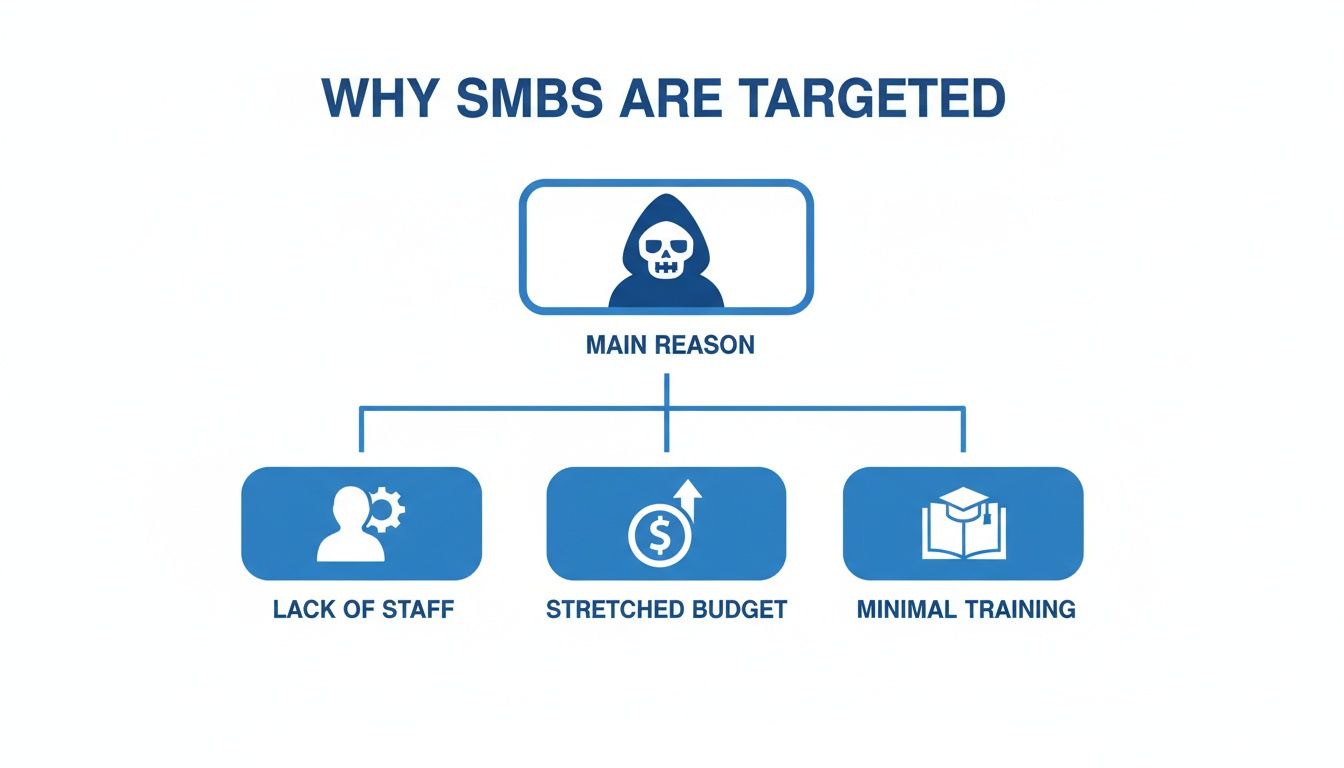
As you can see, attackers prey on businesses with stretched budgets and teams, where these foundational security tasks often get overlooked.
Protecting Your Crown Jewels
Your data—customer lists, financial records, intellectual property—is your most valuable asset. A ransomware attack can encrypt every last file in minutes, bringing your entire operation to a grinding halt. The only truly reliable defence against this is a robust and frequently tested backup and recovery strategy.
Imagine a fire tears through your office. A good backup is like having a complete, fireproof copy of every important document stored securely off-site. For it to actually work when you need it, you have to have a clear plan.
Your backup strategy is only as good as your last successful recovery test. Don't just assume your backups are working; regularly test them to ensure you can restore your data quickly and completely when the worst happens.
A solid strategy means having multiple copies of your data, with at least one of them stored offline or in a separate, secure cloud environment. This ensures that even if your live network is compromised, your backup data remains untouched and ready to get you back on your feet.
Empowering Your People
Finally, technology alone isn't enough. Your employees are your human firewall, but they need the right training to be effective. A staggering 59% of New Zealand businesses suffered a successful cyber-attack in the past year. As you can discover in more detail from recent NCSC insights, the causes range from unsecured websites (21%) and cloud misconfigurations (35%) to even internal actors (17%). This just proves that a comprehensive defence has to address both external threats and internal vulnerabilities.
Effective security awareness training teaches your team how to spot and report threats before they cause damage. This includes:
- Recognising Phishing Attempts: Training staff to identify suspicious emails, dodgy links, and unexpected attachments.
- Promoting Secure Habits: Encouraging good practices like locking computers when they step away and never sharing passwords.
- Establishing Clear Reporting Procedures: Making it easy and safe for employees to report anything suspicious without fearing they'll get in trouble.
Turning your team into a security asset is one of the most cost-effective investments you can make. For small businesses, managing all these layers can feel complex, which is where services like 365 Assistance can step in to provide the expert support needed to get these foundational pillars right.
Finding the Right Managed Security Partner

Let’s be honest. For most Kiwi SMBs, trying to manage the sheer complexity of cyber security in-house is a non-starter. The expertise required is deep, the tech is always evolving, and it’s a massive time sink. This is where a Managed Security Service Provider (MSSP) becomes less of a luxury and more of an essential business partner.
But not all providers are the same. You aren't just looking for a vendor to sell you some software. The real goal is to find a genuine partner—a team that integrates with your business, gets to know your goals, and basically becomes an extension of your own team. A great MSSP doesn't just put out fires; they work proactively to stop them from starting in the first place.
They take the time to learn your operations, your ambitions for growth, and your specific risk profile. This is how they deliver real strategic value and a tangible return on your security investment, instead of just being another line item on your monthly expenses.
What to Look for in a Security Partner
Choosing the right partner for cyber security in New Zealand is about more than ticking boxes on a service list. You need a team that brings together local knowledge, deep technical skill, and a real commitment to seeing you succeed. A proactive partner effectively becomes your dedicated security operations centre, constantly monitoring, managing, and responding to threats on your behalf.
This boils down to a few key functions:
- 24/7 Monitoring and Threat Detection: Attackers don't stick to a 9-to-5 schedule, and neither should your security. A good partner provides around-the-clock monitoring to spot and shut down threats before they can do any harm.
- Proactive Vulnerability Management: They should be actively scanning your systems for weak spots, managing software patching, and making sure your defences are always a step ahead of the latest threats.
- Strategic Security Guidance: A true partner helps you build a security roadmap that actually lines up with your business goals, ensuring your security measures support your growth instead of getting in the way.
This integrated approach is everything. You're not just offloading a task; you're bringing in a strategic ally who understands the local threat landscape and can explain technical risks in terms of clear business impact. For many businesses, this relationship starts with broader IT support, which you can read more about in our complete guide to managed IT services for New Zealand businesses.
Critical Questions to Ask Potential Providers
To become a smart buyer and tell the real partners from the simple vendors, you need to ask the right questions. Your mission is to understand their processes, their expertise, and exactly how they plan to help your business operate securely.
Before you even think about signing a contract, make sure you get clear, confident answers to these questions:
How do you align security with our business goals?
A great provider will want to understand your operations and growth plans first. They should be able to clearly explain how their security advice will enable your business, not just lock it down.What is your incident response plan?
Ask them to walk you through, step-by-step, how they handle a security breach. Who do you call? What are the immediate first actions? A vague or hesitant answer here is a massive red flag.How do you stay current with the New Zealand threat landscape?
Threats change from region to region. Your partner should be able to talk about specific trends hitting Kiwi businesses and show they understand local compliance and reporting rules.How will you report on our security posture?
You need straightforward, easy-to-read reports that show your security status, the threats they’ve dealt with, and practical recommendations for improvement. Don't be afraid to ask for a sample report.
A partner like Wisely really leans into this deep integration. Our approach is never just about installing software; it’s about understanding your unique processes and goals to build security solutions that protect your operations and fuel your long-term success.
Choosing an MSSP is one of the most critical business decisions you'll make. Take your time, ask the tough questions, and find a partner who is as invested in your security as you are.
Who to Call When a Cyber Incident Happens
When a cyber attack hits, the first few hours are a blur of chaos and high stress. Knowing exactly who to call—and in what order—can make a world of difference. It’s what separates a manageable incident from a full-blown business disaster. This isn’t the time for guesswork; you need a clear, well-rehearsed action plan.
Your very first call should always be to your IT provider or Managed Security Partner. They’re the ones on the ground who can immediately jump into action and start the technical work of containing the threat. Once they have things in hand, your next step is to get in touch with the official New Zealand reporting channels.
Your Primary Reporting Contacts
Different agencies in New Zealand are set up to handle different types of incidents. Contacting the right one from the get-go means you get the support you actually need, fast.
CERT NZ (The Computer Emergency Response Team): For most cyber security incidents, CERT NZ should be your first official port of call. Think of them as the paramedics for the digital world. They deal with everything from phishing and scams to unauthorised access and crippling ransomware attacks, providing expert advice to help you navigate the situation.
The New Zealand Police: If the incident clearly crosses into criminal territory—like online fraud, theft of funds, or extortion—then you need to bring in the Police. They’ll handle the criminal investigation side of the attack.
When to Report to Other Agencies
In some specific cases, you might need to loop in other organisations.
The National Cyber Security Centre (NCSC) focuses on threats of national significance, so most Kiwi SMEs won't be reporting to them directly. However, if a data breach involves personal information and could cause serious harm to individuals, you are legally required to notify the Office of the Privacy Commissioner.
To make it easier, here’s a quick guide to help you direct your report to the right place.
NZ Cyber Incident Reporting Guide
| Type of Incident | Primary Contact | When to Report |
|---|---|---|
| Phishing, Scams, Ransomware | CERT NZ | Report immediately to get advice on containment and recovery. |
| Online Fraud, Theft, Extortion | NZ Police | Report as soon as a crime has been identified. |
| Data Breach with Serious Harm | Office of the Privacy Commissioner | Notify as soon as you're aware of a notifiable privacy breach. |
Having this information ready isn't just about ticking a box; it's about turning panic into a structured, effective response.
In the heat of a crisis, having a documented response is critical. This forms a core part of effective business continuity planning for resilient Kiwi SMBs, ensuring your team knows precisely what to do to protect the business and its customers.
Knowing who to call transforms a chaotic scramble into a manageable process. That clarity is absolutely key to minimising the disruption and getting your business back on its feet.
Your Cyber Security Questions Answered
Stepping into the world of cyber security can feel a bit daunting, especially when you're busy running a Kiwi business. To help clear things up, we’ve put together some plain-English answers to the questions we hear most often. Think of this as a quick-reference guide to help you take your next steps.
What's the Single Biggest Cyber Threat to My Small Business?
While big, dramatic ransomware attacks steal the headlines, the most common and costly threat for New Zealand SMEs is actually phishing. These are the sneaky, deceptive emails designed to fool you or your team into handing over sensitive details like passwords or account information.
Phishing is often just the first step. It’s the open door that leads to much bigger problems like Business Email Compromise (BEC), where criminals get into your email, impersonate a director, and authorise fake payments. Because it all hinges on human error, consistent staff training is one of the most powerful defences you can have.
Do We Genuinely Need Multi-Factor Authentication?
Yes, absolutely. If you take only one action after reading this guide, make it switching on Multi-Factor Authentication (MFA) everywhere you can. The number one way attackers get into business systems is with a stolen password.
Think of MFA as a digital deadbolt on your front door. Even if a thief manages to get a copy of your key (your password), they still can't get inside without the second check – which is usually a unique code sent to your phone. It's the most effective, single step you can take to secure your accounts.
Activating MFA across all your important platforms, especially email, accounting software, and anything with sensitive data, massively reduces your risk.
How Much Should We Be Budgeting for Cyber Security?
There isn't a magic number that fits every business. The right investment really depends on your company's size, your industry, and the kind of data you handle. A good way to think about it is to stop seeing security as just another cost and start treating it as a fundamental part of doing business, just like insurance or legal advice.
For many SMEs, partnering with a Managed Security Service Provider (MSSP) is the most practical path. It gives you access to top-tier security tools and genuine expertise for a predictable monthly fee, which is almost always more cost-effective than trying to hire a specialist in-house. This way, your security can grow right alongside your business.
What Should I Do the Moment I Realise We've Been Attacked?
Those first few minutes after you spot a breach are absolutely critical. The goal is to contain the problem and stop it from getting worse.
- Isolate the Machine: The first thing you need to do is disconnect the affected computer or server from the internet and the office network. Pull the plug. This stops the attack from spreading.
- Call Your IT Partner: Your very next move should be to call your IT support provider or MSSP. They have the skills and tools to figure out what’s happened and kick off a proper incident response.
- Change Key Passwords: If you can still access your accounts, immediately change the passwords for your most important systems, starting with your email and any admin-level accounts.
Once you’ve taken these immediate steps, you can move on to the formal process of reporting the incident to CERT NZ and letting any affected customers or partners know.
Keeping your business safe today means being proactive, not reactive. At Wisely, we work alongside Kiwi businesses to build smart, resilient security plans that fit their goals. We provide the expertise and support you need to stand up to modern threats. See how we can help protect what you've built at https://www.wiselyglobal.tech.
Article created using Outrank