Microsoft 365 Business Premium is an all-in-one platform built specifically for businesses with up to 300 employees. It bundles the classic productivity apps we all know with serious, enterprise-grade protection and device management, all wrapped up in a single, cost-effective licence.
It’s much more than just Word and Excel.
Your Digital Master Key

Think of Business Premium as the digital master key to your entire business. So many growing Kiwi businesses get by with a patchwork of different tools—one for email, another for file storage, and several others for security. This approach doesn’t just get complicated and expensive; it leaves dangerous security gaps wide open.
Business Premium solves this by bringing three critical pillars together in one place. Before diving in, getting a clear picture of What Is M365 is a great starting point for any business considering this powerful suite. It’s a shift from just using apps to operating within a fully integrated system designed for how we work today.
The Three Core Pillars
At its heart, the platform is built to solve the real-world challenges of a dynamic small to medium-sized business. Let's break it down into its three core components.
Powerful Productivity Apps: You get the familiar Office apps like Word, Excel, and PowerPoint, but they're supercharged with cloud collaboration tools like Teams, Exchange, and OneDrive. This is your engine for getting work done.
Advanced Cyberthreat Protection: This is what really sets Business Premium apart. It includes sophisticated tools that defend against phishing, ransomware, and other nasty cyber threats that can cripple a small business.
Simplified Device Management: It gives you the power to manage and secure every device that connects to your company data—laptops, tablets, and phones—whether they're company-owned or personal devices (BYOD).
This integrated approach is the secret sauce. Your team can work together securely from anywhere, on any device, without you having the headache of juggling multiple vendors and mismatched solutions.
To give you a clearer view, here's a quick summary of what's inside.
Microsoft 365 Business Premium at a Glance
| Category | Key Features | Primary Benefit for Your Business |
|---|---|---|
| Productivity & Collaboration | Office Apps (Word, Excel, PowerPoint), Teams, Exchange Online, SharePoint, OneDrive | Empowers your team to work together efficiently from any location, keeping everyone on the same page. |
| Advanced Security | Microsoft Defender for Business, Microsoft Entra ID P1, Data Loss Prevention | Protects your business from cyber threats like phishing and ransomware, securing your critical data. |
| Device Management | Microsoft Intune | Allows you to secure and manage all devices (laptops, phones) accessing company data, simplifying IT. |
Ultimately, Business Premium provides a secure and efficient foundation that’s built to support your growth, not hold you back. As we explore its features, you’ll see how it delivers real, tangible value that goes far beyond a simple software subscription.
Unpacking Your Digital Productivity Toolbox

At its heart, Microsoft 365 Business Premium is about taking the tools you already know and weaving them into a single, intelligent ecosystem. It’s not just about giving your team Word, Excel, and PowerPoint; it’s about connecting them to the cloud to create a fluid, modern way of working.
Think of it this way: the classic Office suite is like a set of high-quality, standalone tools. They’re great on their own, but Business Premium brings them all together into a connected workshop where everything works in sync. That’s where the real magic begins.
Instead of the old chaos of emailing different versions of a file back and forth, your team can jump into a single document and co-author it in real-time. This simple shift from working in silos to genuine collaboration is a massive step towards better efficiency and smarter ideas.
The Central Hub for Teamwork
Beyond the apps themselves, Microsoft Teams stands out as the command centre for your team's communication and collaboration. It tidies up the digital clutter by bringing everything your people need to work together into one place, cutting out the need to jump between a dozen different apps.
Teams brings several critical functions under one roof:
- Instant Messaging: Perfect for quick questions, team-wide updates, and focused project chats that keep important conversations out of overflowing email inboxes.
- Video Meetings: Host secure, high-definition video calls with screen sharing, recording, and virtual backgrounds, making remote work feel connected and personal.
- File Sharing and Storage: Because it links directly with SharePoint and OneDrive, you can store, share, and edit files right inside a conversation or project channel.
This consolidation means less time wasted switching contexts and more time invested in the actual work. It helps build a more connected team culture, whether you’re all in the office or spread across the country.
By creating a single source of truth for communication and files, Teams eliminates the common frustrations of hunting for information. Everything is exactly where you expect it to be, accessible from any device.
The Professional Backbone Your Business Needs
To operate professionally, every business needs a solid foundation for its core functions. Microsoft 365 Business Premium delivers this with two essential components that quietly keep everything running smoothly in the background.
First up is enterprise-grade email, powered by Microsoft Exchange. This is far more than a basic inbox. It’s a secure, reliable platform giving each user a 50 GB mailbox, advanced calendaring, and powerful protection against spam and malware. It’s about ensuring your business communications look professional and stay secure.
The second is a generous 1 TB of OneDrive cloud storage for every single user. This gives your team plenty of room to store, sync, and securely share files from any device. It also serves as an automatic backup, protecting crucial work if a laptop gets lost or fails. Our detailed guide offers more strategies on how to increase team productivity by making the most of tools like these.
Together, professional email and massive cloud storage form the operational backbone that supports everything else in the suite.
For a great local example of this in action, just look at Todd Energy, a major NZ-owned energy producer. When they adopted Microsoft 365, they empowered their field workers with remote access to critical documents on their mobile devices. The impact was immediate: staff reported finding information 60% faster, which streamlined their operations and reduced engineering risks. You can read more about Todd Energy's successful implementation.
All these tools combine to create a cohesive digital workspace that fuels collaboration, secures your communications, and gives your team what they need to do their best work—no matter where they are.
Building Your Digital Security Fortress

While the productivity apps help your business run day-to-day, it’s the advanced security features in Microsoft 365 Business Premium that make sure it stays running. For any NZ business, protecting your data isn't just an IT job anymore; it's a fundamental business responsibility. A single breach can shatter your reputation, drain your finances, and break the trust you've built with clients.
Think of Business Premium's security as a multi-layered fortress for your digital office. It isn't just one big wall. It’s a whole system of coordinated defences, each designed to stop a different kind of threat before it can do any real damage.
These tools work together quietly in the background, giving you the kind of enterprise-grade protection that was, until recently, only within reach for massive corporations. Now, that same level of security is right here, accessible and manageable for small and medium-sized businesses.
Your 24/7 Digital Security Guard
Leading the charge is Microsoft Defender for Business. Picture it as your vigilant, 24/7 security guard, constantly patrolling every endpoint in your business—laptops, desktops, and mobile phones. It actively hunts down and deals with threats like viruses, spyware, and the ever-present danger of ransomware.
But it doesn't just react to threats we already know about. Defender for Business uses smart analytics to spot suspicious behaviour that might be the sign of a brand-new attack, stopping it cold before your data is compromised. It’s this proactive approach that makes it so powerful for protecting what matters most.
This level of endpoint security isn’t a "nice-to-have" anymore; it’s an absolute must-have. If you're looking to build a more robust defence, our guide on comprehensive cyber security services offers deeper insights into protecting your entire operation.
Securing Your Most Vulnerable Entry Point
Let's be honest, your email inbox is the front door for most cyberattacks. Microsoft Defender for Office 365 acts as a specialist guard for this critical gateway, scanning every single email and attachment for hidden nasties.
It offers crucial protection against two of the biggest risks out there:
- Phishing Attacks: It identifies and blocks malicious emails trying to trick your team into giving up sensitive info like passwords or credit card details.
- Malicious Attachments: It opens and tests attachments in a safe, isolated environment (a "sandbox") to see if they contain malware before they can ever land in your team's inboxes.
By taking these threats out of the equation before a user even gets a chance to click, Defender for Office 365 drastically cuts down on the risk of human error causing a major security incident.
Think of it as an advanced mail screening room. Every package (email) is inspected for danger before being delivered, ensuring only safe correspondence reaches your employees. This proactive filtering is a cornerstone of modern email security.
Verifying Identity and Controlling Access
In today's world of remote and flexible work, knowing exactly who is accessing your data is paramount. This is where Microsoft Entra ID Premium P1 (which you might remember as Azure AD) steps in. It's your digital bouncer, making sure only authorised people can get into your digital workspace.
Its most critical feature is Multi-Factor Authentication (MFA). Think of MFA like needing both a keycard (your password) and a unique PIN (sent to your phone) to open a secure door. This simple extra step makes it 99.9% less likely for a cybercriminal to get into an account, even if they've managed to steal a password.
Entra ID P1 also lets you create Conditional Access policies. For instance, you can set rules that automatically require MFA when an employee logs in from a new location or an unfamiliar device. This adds an intelligent layer of security that adapts to risk in real time. To get the most out of your M365 environment, it's essential to follow strong cloud security best practices like these.
When all these tools work in concert—Defender protecting your devices, Defender screening your email, and Entra ID guarding your identities—you create a truly formidable security posture that protects your data, your clients, and your hard-earned reputation.
Managing Your Fleet of Business Devices
Modern business isn't just about software and security anymore; you need a tight grip on the hardware that accesses your company data. That's where Microsoft 365 Business Premium steps in, giving you a powerful way to manage every single laptop, phone, and tablet connected to your business—whether you own them or your team does.
At the heart of this is Microsoft Intune, which is best thought of as a universal remote for your entire device fleet. It's the tool that lets you set the ground rules for how devices can access company information, ensuring that no matter where your team is working from, your data stays firmly under your control.
This is more important than ever. With flexible work now the norm, the line between a personal phone and a work device has all but disappeared. Intune provides the framework to embrace this new reality securely, without giving up control over your most sensitive information.
The Power of Centralised Control
Trying to manage a fleet of devices without a tool like Intune is a manual, soul-crushing nightmare. Setting up one new laptop could swallow hours of your day, and trying to enforce security rules across dozens of different phones is practically impossible. Microsoft 365 Business Premium completely flips this script by centralising all your device management.
From one single, clean console, you can:
- Enforce Security Policies: Mandate strong passwords, switch on device encryption, and make sure antivirus software is running and up-to-date on every device.
- Deploy Necessary Apps: Automatically push essential software like the Office suite or specific business apps to your team’s devices, so everyone has what they need from day one.
- Remotely Wipe Company Data: If a phone gets lost or a laptop is stolen, you can selectively wipe all company data from it in minutes, without touching any of the user's personal photos or files. It's a lifesaver.
This centralised command-and-control massively cuts down the admin work for your IT team and guarantees a consistent security posture across the board.
Finding the Right Balance with MDM and MAM
To deliver this level of control without frustrating your team, Intune uses two distinct but connected approaches: Mobile Device Management (MDM) and Mobile Application Management (MAM). Getting your head around the difference is the secret to building a secure environment that people actually like using.
Mobile Device Management (MDM) is built for company-owned devices. It gives you full-reign control over the entire device, letting you manage settings, enforce compliance, and configure it from the ground up. You’re essentially the administrator of the device itself.
Mobile Application Management (MAM), on the other hand, is the perfect solution for personal devices used for work (the whole BYOD scenario). Instead of locking down the entire device, MAM focuses only on the corporate apps and the data inside them.
Think of it like this: MDM manages the entire house (the device), while MAM just manages the company's secure office room inside that house (the work apps). This lets employees use their own phones for work without feeling like their privacy has been invaded.
This dual strategy gives you the power to secure your data wherever it lives, whether that's on a company-issued laptop or a team member's personal smartphone. You can create rules that stop someone from copying text from a managed app like Outlook and pasting it into their personal Notes app, effectively creating a secure bubble for your business information.
For example, you can let an employee check work emails and open files on their personal iPhone, but completely block them from saving a sensitive client proposal to their personal cloud drive. It's the perfect balance of protecting your data while respecting your team's privacy—ultimately saving everyone countless hours of manual setup and support headaches.
Choosing the Right Microsoft 365 Plan
Trying to pick the right Microsoft 365 plan can feel a bit like staring at a wall of options. It’s easy to get bogged down in feature lists, but the real key is to think past the checklist and focus on what your business actually needs to grow securely.
Many Kiwi businesses naturally start with Microsoft 365 Business Standard. It’s a fantastic productivity package, giving you all the familiar Office apps plus collaboration mainstays like Teams and OneDrive. The catch? It doesn’t include the advanced security and device management layers needed to fend off modern cyber threats.
Think of it this way: Business Standard gives you a fully-equipped workshop, but you’ve left the doors and windows unlocked. Your team can be incredibly productive inside, but your most valuable assets—your data—are completely exposed. This is exactly where the value of Microsoft 365 Business Premium becomes so obvious.
The Strategic Sweet Spot for SMBs
For most growing small to medium-sized businesses, Business Premium hits the perfect sweet spot. It takes everything from Business Standard and builds that digital security fortress we talked about right on top. Suddenly, you have advanced threat protection, solid identity management, and the ability to control how and where devices access your data.
This isn't just a minor upgrade; it's a fundamental change in how you approach your business's security. It’s the difference between just having tools and having a secure, cohesive system that works together. The real return on investment shows up when you drastically lower your risk of a costly data breach, simplify IT management, and build genuine resilience into your operations.
This decision tree gives you a great visual on how Business Premium helps you wrangle all the different devices connecting to your network, whether they're company-owned or personal ones.
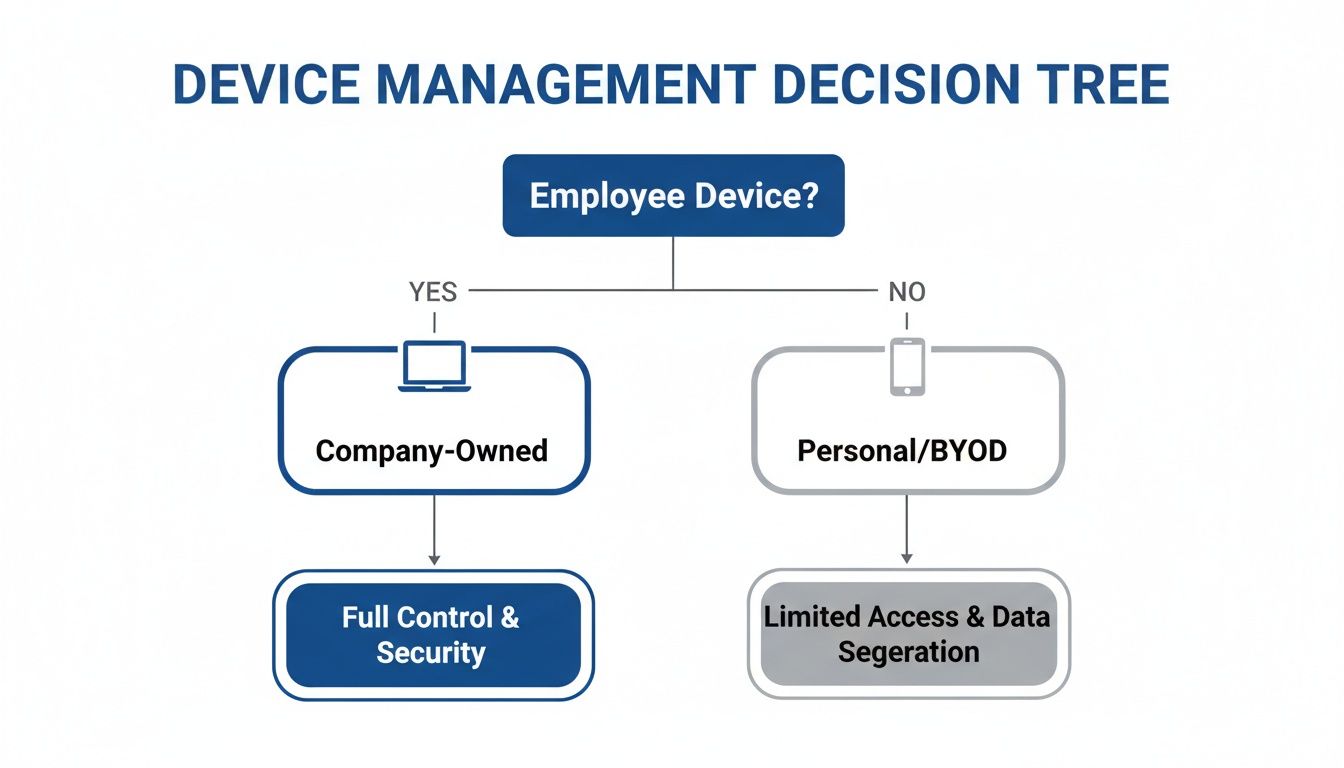
As you can see, Intune (which is part of the package) lets you create separate, sensible policies for corporate laptops versus employee-owned smartphones. It’s all about giving you flexibility without ever compromising on security.
To make the differences clearer, here’s a quick comparison of the most common plans for SMBs.
Microsoft 365 Business Plan Comparison
This table breaks down the core differences to help you see where the value lies for your specific security, productivity, and management needs.
| Feature Area | Business Standard | Business Premium | Enterprise E3 |
|---|---|---|---|
| Office Apps & Services | ✅ | ✅ | ✅ |
| Email & Calendaring | ✅ | ✅ | ✅ |
| File Storage & Sharing | ✅ | ✅ | ✅ |
| Teamwork & Communication | ✅ | ✅ | ✅ |
| Advanced Threat Protection | ❌ | ✅ | ✅ |
| PC & Mobile Device Management | ❌ | ✅ | ✅ |
| Identity & Access Management | Basic | Advanced | Advanced |
| Data Loss Prevention | ❌ | Basic | ✅ |
| Compliance & Archiving | ❌ | Basic | Advanced |
Ultimately, the choice comes down to your risk tolerance and operational complexity. While Business Standard gets you started, Business Premium is where true, modern security begins.
When to Consider Enterprise E3
So, is there ever a reason to look past Business Premium? Absolutely. Microsoft 365 E3 is the next tier up, usually reserved for larger organisations or those with very specific compliance or IT demands.
E3 builds on Premium’s foundation with more powerful tools for things like legal hold, data governance, and in-depth analytics. But unless you're navigating complex regulatory waters or have a large, dedicated IT department to manage it all, Business Premium almost always strikes the perfect balance of powerful features and real-world value.
For the vast majority of businesses with up to 300 employees, Microsoft 365 Business Premium delivers the comprehensive security and productivity needed to thrive. It’s an investment in resilience.
The plan has proven its worth in demanding environments. Take Airways New Zealand, which used the platform to meet strict public records standards. Their success story mirrors the plan's strengths for NZ SMBs, from advanced access controls to organised collaboration in Teams. Their results speak for themselves, cutting device management time by 24% and costs by up to 60% compared to juggling separate tools. You can read more details on this successful case study to see how they did it.
How a Partner Elevates Your Microsoft 365 Experience
Buying a Microsoft 365 Business Premium licence is just the beginning. Think of it like buying a high-performance car engine; it has incredible potential, but you still need an expert mechanic to install it, tune it to your car, and keep it running smoothly.
An expert partner plays that exact role. They take this powerful piece of software and turn it into a genuine business solution, built specifically for how your organisation works.
Their work starts well before anyone logs in for the first time. It begins with a strategic plan that maps out your business goals and figures out exactly how the platform’s features will help you get there. This makes sure your investment is tied to real results from day one.
From Strategic Planning to Seamless Execution
The initial setup and migration can feel like a huge task, full of technical traps that can easily disrupt your business. A specialist partner handles all that complexity for you, ensuring a smooth and secure transition of your critical data—emails, files, calendars, the lot.
They do the technical heavy lifting so your team experiences as little downtime as possible and can start using the new tools straight away. Getting this foundation right is absolutely critical.
Once you're up and running, the partnership shifts. Instead of just reacting to problems, a great partner provides proactive, ongoing managed support.
- Proactive Security Monitoring: They keep a constant watch over your digital environment, spotting and stopping threats before they can cause any real damage.
- Continuous Optimisation: They make sure your security settings and configurations are always up-to-date and aligned with best practices, keeping your defences strong.
- Expert User Support: Your team gets a direct line to specialists who can answer questions and sort out issues quickly, which drives adoption and keeps everyone productive.
For a closer look at how this dedicated support works in practice, our guide on Microsoft 365 assistance explains the value of having an expert team in your corner.
Unifying Your Entire Workflow
Perhaps the most significant value a partner brings is their knack for integration. Your business doesn't operate in a vacuum, and your software shouldn't either. A partner can connect Microsoft 365 Business Premium with the other tools you rely on, creating a single, automated workflow.
Take monday.com, for example. By integrating it with Microsoft 365, a partner can build automated processes that link your team’s conversations directly to project tasks and deadlines. This gets rid of manual data entry and creates one single source of truth for your operations.
Ultimately, working with a specialist means you’re not just using the tools—you’re mastering them. They unlock the full potential of your investment, turning it into a strategic asset that delivers measurable gains in productivity and security, giving you a real competitive edge.
Your Questions, Answered
Jumping into a new business platform always brings up a few questions. To help you get the clarity you need, we've gathered some of the most common queries we hear from NZ businesses looking at Microsoft 365 Business Premium.
Is It a Good Fit for a Business with Fewer Than 10 Staff?
Absolutely. While the licence can scale up to 300 users, its real power for a small team is in the security it provides. For a small business, a single cyber-attack can be catastrophic, and Business Premium gives you the kind of enterprise-grade protection that would normally be well out of reach.
Think of it as a foundational investment. You’re protecting your critical business data, your client information, and the reputation you’ve worked so hard to build, right from day one. That makes it a perfect fit, even for the smallest teams.
Can We Move Our Existing Emails and Files Over?
Yes, and this is a critical part of getting set up properly. It doesn't matter if your data is currently on an old server in the office or with another cloud provider like Google Workspace; there are proven, reliable processes to bring everything across to the new platform.
A good partner will handle this entire process for you. They’ll ensure a seamless and secure transfer of all your emails, calendars, and files with as little disruption to your team as possible, managing all the technical heavy lifting behind the scenes.
The secret to a stress-free switch is a well-managed migration. Your partner's job is to make sure not a single email or file gets lost in transit, so your team can log in on day one and get straight to work with complete confidence.
What's the Real Difference Between Business Premium and Just Using Separate Tools?
It really comes down to two things: integration and simplified management. When you try to patch together different tools for email, security, and file sharing, you inevitably create security gaps, add to your admin workload, and give your team a clunky, disjointed experience.
Microsoft 365 Business Premium brings it all together under one roof. Every component is designed from the ground up to work together seamlessly. This not only cuts costs by consolidating your vendors but also massively strengthens your security by closing the gaps between different apps. Plus, you can manage everything from a single admin console. It’s simply a smarter, more secure way to run your business.
Do We Need Our Own IT Team to Manage All This?
Business Premium is definitely built for businesses that don’t have a big, in-house IT department. However, its advanced security features are not a "set and forget" affair—they need expert configuration and ongoing monitoring to be effective. If you get this part wrong, you could be leaving the door wide open.
This is exactly where a managed IT partner like Wisely comes in. We become your IT team, handling the initial setup, keeping a close eye on security, and providing support for your users. It frees you up to focus on what you do best: running your business, with the peace of mind that your technology is both powerful and secure.
Ready to secure and streamline your business operations? Wisely can help you implement, manage, and optimise Microsoft 365 Business Premium to unlock its full potential. Contact us today to get started.